December is when your email list does its most important work. Nonprofits in the M+R Benchmarks study received 37% of their 2025 online revenue in December, and 4% on December 31 alone. The emails you send in the last six weeks of the year carry a large share of your annual online results. Below are nine year-end appeal email templates you can copy and adapt, from an early ask in mid-November through the January thank-you. Each one comes with a send date and the donor segment it's written for. You'll also find a 2026 sending calendar, subject lines grouped by purpose, and a checklist for tracking results in your CRM. 
Your nonprofit's online store is probably working exactly as it should. Supporters browse, they buy, orders land in Salesforce. But the moment your team walks into a room full of the same supporters, at a gala, a 5K, a community fair, a table by the front door, that store goes quiet. Someone has to write down a name, collect a check, or point people back to a link they'll forget to click. That gap is now closed. With the Soapbox Engage Onsite companion app, included with Soapbox Engage Shop, staff and volunteers can sell your existing Shop products in person from a phone or tablet. Each sale syncs to Salesforce just like an online order. 
Giving Tuesday 2026 falls on Tuesday, December 1, seven weeks from now. That's enough time to plan a strong campaign, as long as the planning starts this month. Last year's Giving Tuesday set a record in the U.S., and many of your supporters will expect to hear from you that day. Most Giving Tuesday guides stop at the thank-you email. This one goes further. Below you'll find a week-by-week timeline, five email templates you can adapt, a checklist for tracking gifts in your CRM, and a plan for the part most nonprofits skip: turning first-time Giving Tuesday donors into second-time donors. 
For most nonprofits, the last few weeks of the year carry more weight than any other stretch on the calendar. Nonprofits in the M+R Benchmarks 2026 study received 37% of their online revenue in December alone. If your organization hosts a gala, auction, or holiday celebration in November or December, your most engaged supporters will be in one room right as that window opens. What matters is whether their energy keeps working for you after the lights come up. 
Selling products is one of the few fundraising channels that gives supporters something to keep. A t-shirt from your 5K, a wreath from your holiday sale, or a membership card in someone's wallet keeps your organization in view long after the purchase, and more nonprofits are adding a store to their fundraising mix as a result. This list covers 25 product ideas across seven categories, with notes on effort and inventory for each, plus how to pick your first few products and track what sells. 
Advocacy software tends to stay in place long after it stops fitting. It was chosen for a smaller list, a different team, or a campaign calendar that no longer exists, and switching feels like a project nobody has time for. Meanwhile, staff build workarounds, data stays split across systems, and each campaign takes a little more effort than the last. If that sounds familiar, this post covers seven signs your nonprofit has outgrown its advocacy tool, how to tell a tool problem from a strategy problem, and how to plan a switch without disrupting campaigns already in motion. 
If your advocacy campaigns feel like they're getting less traction than they did a year or two ago, the numbers suggest you're not imagining it. Nonprofits are sending more advocacy email to bigger lists, and a smaller share of supporters are taking action. Most of the causes are fixable without a bigger budget or a new hire. This post walks through what the 2026 benchmarks show, the five most common reasons advocacy campaigns underperform, and what to change for each one. 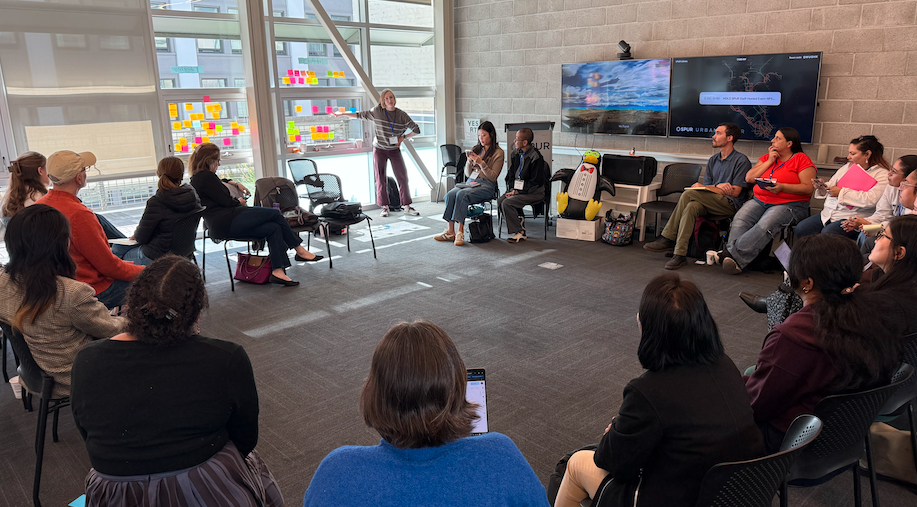
We're back with a recap of NPSP Day San Francisco! On September 23, the Salesforce nonprofit community gathered at the SPUR Urban Center for a day of learning, troubleshooting, and swapping stories about what it really takes to run Salesforce at a nonprofit. The Bay Area community showed up ready to dig in. Solo admins, development directors, finance staff, and consultants filled the room, and the conversations were refreshingly candid. People came with real questions, and just as many came ready with answers they'd learned the hard way. 
Election season brings a lot of nonprofits to the same conversation: supporters are paying attention, issues tied to your mission are on the table, and someone on the team asks whether you should be doing something with that energy. We've written about engaging supporters beyond donations in an election year and about how to run an advocacy campaign once you've picked one. This post covers the decision that comes before both: which approach fits your organization, your issue, and your moment. Petitions and constituent action campaigns are not interchangeable. Picking the wrong one either wastes the attention your supporters are bringing or asks more of your team and your board than the moment calls for. Three questions make the choice a deliberate one. 
Wreath, tree, and poinsettia sales are a holiday tradition at many schools and PTOs. Families want the products anyway, the sale fits naturally into the season, and many buyers come back year after year. The hard part is usually the paperwork: order forms in backpacks, cash and checks in envelopes, a spreadsheet someone builds late at night, and a pickup day that depends on getting all of it right. Moving the sale to an online store takes most of that work off volunteers. This guide covers what to sell, a week-by-week timeline, how to set up the store, and how to run a smooth pickup day. 
Many of the best-known advocacy platforms come bundled inside larger suites: a supporter database, donation forms, event ticketing, email, and advocacy tools, all from one vendor. For some nonprofits, that's exactly right. For others, it means paying for a second CRM and a second donation system just to send constituent messages to legislators. This post walks through what advocacy suites typically include, when a suite makes sense, when a focused advocacy tool on top of your existing CRM is the better fit, and five questions to help you decide. 
A nonprofit online store can look like a success from the outside: products are selling, revenue is coming in, supporters are checking out without trouble. But if that sales data isn't landing in Salesforce automatically, someone on your team is quietly doing the real work after the fact: exporting orders, matching names to existing Contacts, re-entering totals, and hoping nothing gets missed before the next board report. For a nonprofit already running Salesforce, the value of ecommerce software isn't just selling products online. It's whether that commerce activity becomes part of the same supporter and fundraising data your team already works from, or lives apart from it as one more system to reconcile. This guide is for development directors, operations staff, and Salesforce admins evaluating ecommerce software with that question in mind. We'll cover what "Salesforce integration" actually means in ecommerce software, what a strong sync should connect, the questions to ask vendors, and the tradeoffs of routing that connection through middleware. 
A nonprofit gala without a run of show is a series of things that happen in a room. A gala with one is a program with intention, timing, and a clear chain of responsibility for every transition. The run of show is the master document your entire event team works from on event night: every segment, every cue, every owner, and every contingency. It's not the event program guests see. It's the internal production document that keeps your team aligned from setup through close. 
Setting up a nonprofit online store is more approachable than most teams expect. The technical part, choosing a platform and listing products, usually takes an afternoon. The parts that determine whether the store actually raises money and doesn't create a mess later are the decisions around it: what to sell, how to price it, how sales tax works, and where the revenue ends up being tracked. This guide walks through setting up a nonprofit online store from scratch, step by step, whether you're launching a year-round merchandise shop or a seasonal fundraiser store for a specific campaign. Your store doesn't have to be a year-round operation: a campaign-specific storefront can work well for seasonal products, event merchandise, holiday sales, or a limited fundraising push. 
Donors lapsing is an unfortunate reality every nonprofit faces. Donors lapse for a variety of reasons: they no longer have the capacity to give, they fall out of alignment with your mission, or they simply forget to renew a recurring gift. However, nonprofits can use their existing efforts to bring lapsed donors back into the fold. Fundraising campaigns, in particular, remind donors why they contribute to your organization and unite your community behind a shared cause. Large-scale initiatives that feature your high-impact goals and future vision make an especially strong opportunity for re-engagement. 
When the ask goes out at a live fundraising event, something changes in the room. The emcee makes the case. The first paddle goes up. Then another. What starts with one person saying yes can quickly become an entire room coming together to support the mission. That's the power of a paddle raise. Capturing that response in the middle of a fast-moving event, though, takes more than keeping a running tally. 
If you're evaluating nonprofit auction software for an upcoming gala or fundraising event, you've almost certainly come across OneCause, GiveSmart, and Soapbox Engage. All three offer mobile bidding, event management tools, and support for live and silent auctions. The differences between them are real, but they're not always obvious from a features page. This comparison is written for nonprofit development and events professionals who want a clear-eyed look at how these platforms actually stack up, including where each one is strong, where it has limits, and which type of organization it fits best. 
We're back with a recap of NPSP Day New York! On September 3, the Salesforce nonprofit community came together at Building Skills NY in the General Electric Building for a day of learning, problem-solving, and, most importantly, community. New York continues to reign as the host city of the most NPSP Days, and the community always brings the energy. This time was no exception. The room was filled with a great mix of newcomers and old-timers, familiar faces reconnecting and first-time attendees jumping right into the conversation. There was a real willingness to share ideas, ask questions, and help each other tackle the challenges that come with managing Salesforce at a nonprofit. 
A confirmation email is one of the messages registrants are most likely to open. Registrants check it for the event time, the venue, and their order details, often more than once between registering and event day. Too often, though, that message is a generic template that repeats the same static text to everyone, forcing attendees to dig through a separate ticket PDF or call your office to confirm the basics. Merge fields in the Soapbox Engage Events app let confirmation emails automatically pull in each registrant's own registration data, from their name and ticket count to event date, venue, and payment status, without your team writing a custom message for every event. When multiple tickets are purchased in one order, the same message can include details for every attendee. 
Every nonprofit event needs more than a name and an email address. You need to know who wants a vegetarian meal, who requires accessibility accommodations, what size shirt to order, or which workshop track someone plans to attend. The usual result is a registration form that asks everyone every question, whether it applies to them or not, followed by a spreadsheet someone manually reconciles against your CRM afterward. Salesforce custom fields in the Soapbox Engage Events app let you add nonprofit-specific questions directly to your registration form, tied to real Salesforce fields, and shown only to the registrants they actually apply to. The data lands in Salesforce the moment someone registers, with no separate import step. |

 Donations
 Events
 Petitions
 Forms
Forms Shop
Shop Directories